
Monthly meter readings are used to bill you for the actual amount of electricity you use (instead of estimating). Outside of self-read areas, most meters are scheduled to be read every second month.
Extra energy generated by your system cannot be estimated. You must provide regular readings for accurate billing. Your bill will show an “energy received” line that lists the excess energy we bought from your system.
Because the energy used and the excess energy generated cannot be forecasted, you’re not eligible for our Equal Payment Plan.
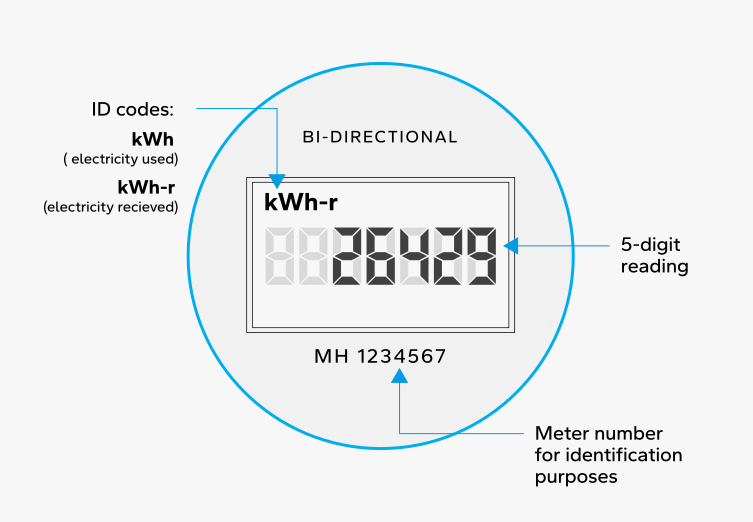
When you enter your meter readings when logged into your online account, follow these instructions:
- MH XXXXXXX
Enter the reading on the meter when kWh shows below the display reading. - MH XXXXXXX-R
Enter the reading on the meter when kWh-r shows below the display reading.
If you’re not logged into your online account, you’ll need to enter each meter number and reading. The meter number is displayed on your bi-directional meter.
Watch our videos on how to read your bi-directional meter
Use your browser to submit meter readings online
Video: 0:54
Use our app to submit meter readings online
Video: 0:48
What to do next
If your meter is blank or doesn’t display a reading, call 1‑888‑624‑9376 (1‑888‑MBHYDRO). Otherwise, write down your meter number and submit your meter reading.